


Why am I seeing this picture? Media Credit – Freepik
Important Note for Sellers: To set up a business profile which is mandatory for sellers, create an account with an email address from your business domain (Example - [email protected]).

Subscription Plans & Feature Availability  ✓ Give  ✓ Nurture  ✓ Thrive  ✓ Flourish
You post a job for a clinical engineer who can service imaging equipment. Two weeks later, the inbox is full of IT support resumes, sales profiles, and one person who clearly didn’t read past the title.
Meanwhile, the engineer you actually want is scrolling past, because your post didn’t say where the job was, what the day-to-day involved, or whether it was a permanent hire or a contract.
This is a common problem in hiring. Research from a large job board found that 39% of candidates avoid applying when a job title is unclear, and a separate study reported that almost 77% of jobseekers had found expectations in job ads unclear in their latest search. In a field where roles are narrow and talent is scarce, an unclear post costs more than time. It costs you the right person.
Why generic job posts fail technical roles
Med-tech and healthcare hiring has two difficulties that general job boards don’t solve:
- The roles are specific. “Service Engineer” could mean a field technician repairing patient monitors or a specialist calibrating radiology systems.
- The location matters. A study of Polish job seekers found that 37% would abandon an application they found interesting if the exact job location wasn’t specified. Field roles are often tied to a facility or region.
Writing a precise post for each role is slow. Many recruiters skip the detail, and the post suffers.
A better way to build the job listing
Gerätor’s job listing form is built to collect accurate information, using a proprietary taxonomy together with geolocation features. It also comes with Wiz, an AI agent that researches the role and inserts suitable content into the listing fields at the click of a button.
You’ll need an approved business profile to post jobs. If you haven’t set yours up yet, start with how to build your business presence. Then head to your dashboard.
Step 1: Basic information
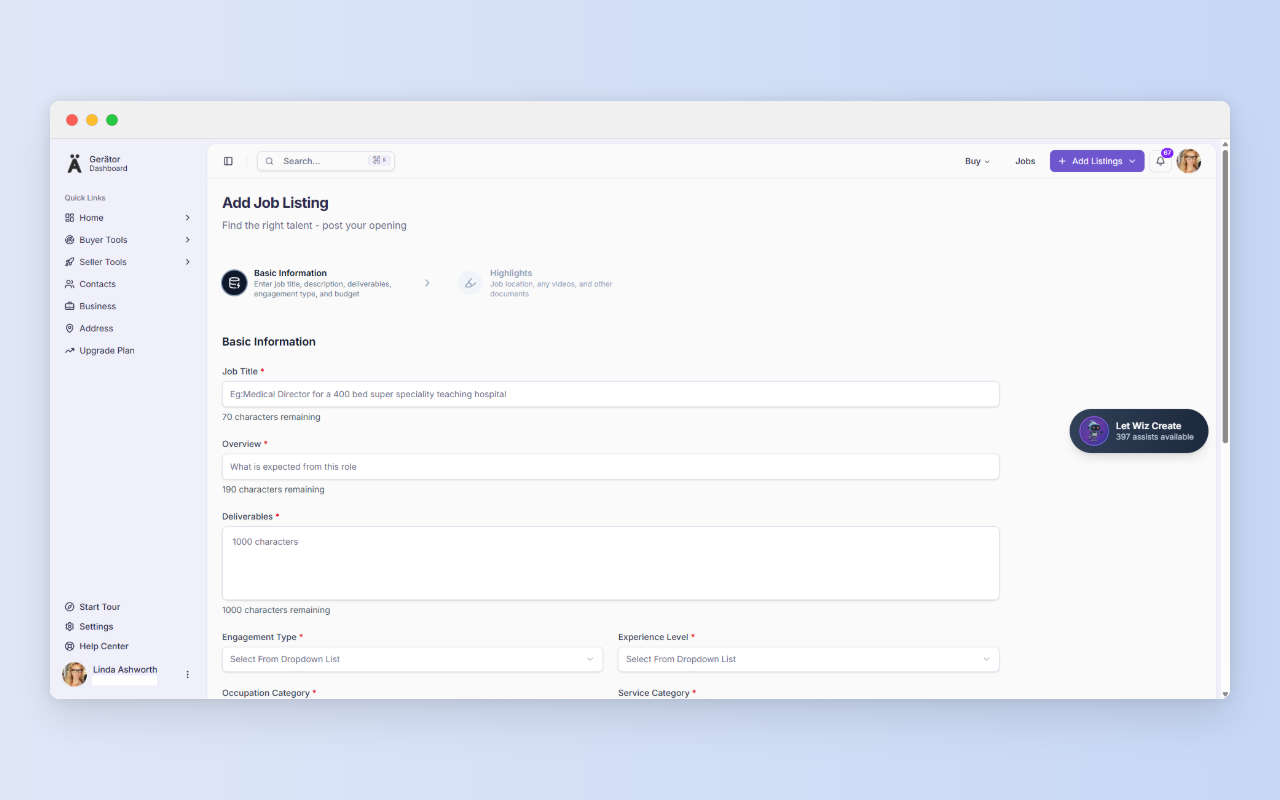
This step defines the role. It has seven fields:
- Job Title (70 characters): Use the common name for the role. Industry guidance suggests keeping titles concise, around 50 to 60 characters.
- Overview (190 characters): The short hook. What does this role actually do?
- Deliverables (1,000 characters): The substance. One source recommends five to eight core responsibilities, which fits this space well.
- Engagement Type: How the work is structured.
- Experience Level: Say clearly how senior the role is. One hiring platform notes that leaving desired experience blank can reduce visibility and applicant volume.
- Occupation Category and Service Category: These classify the role so the right candidates find it.
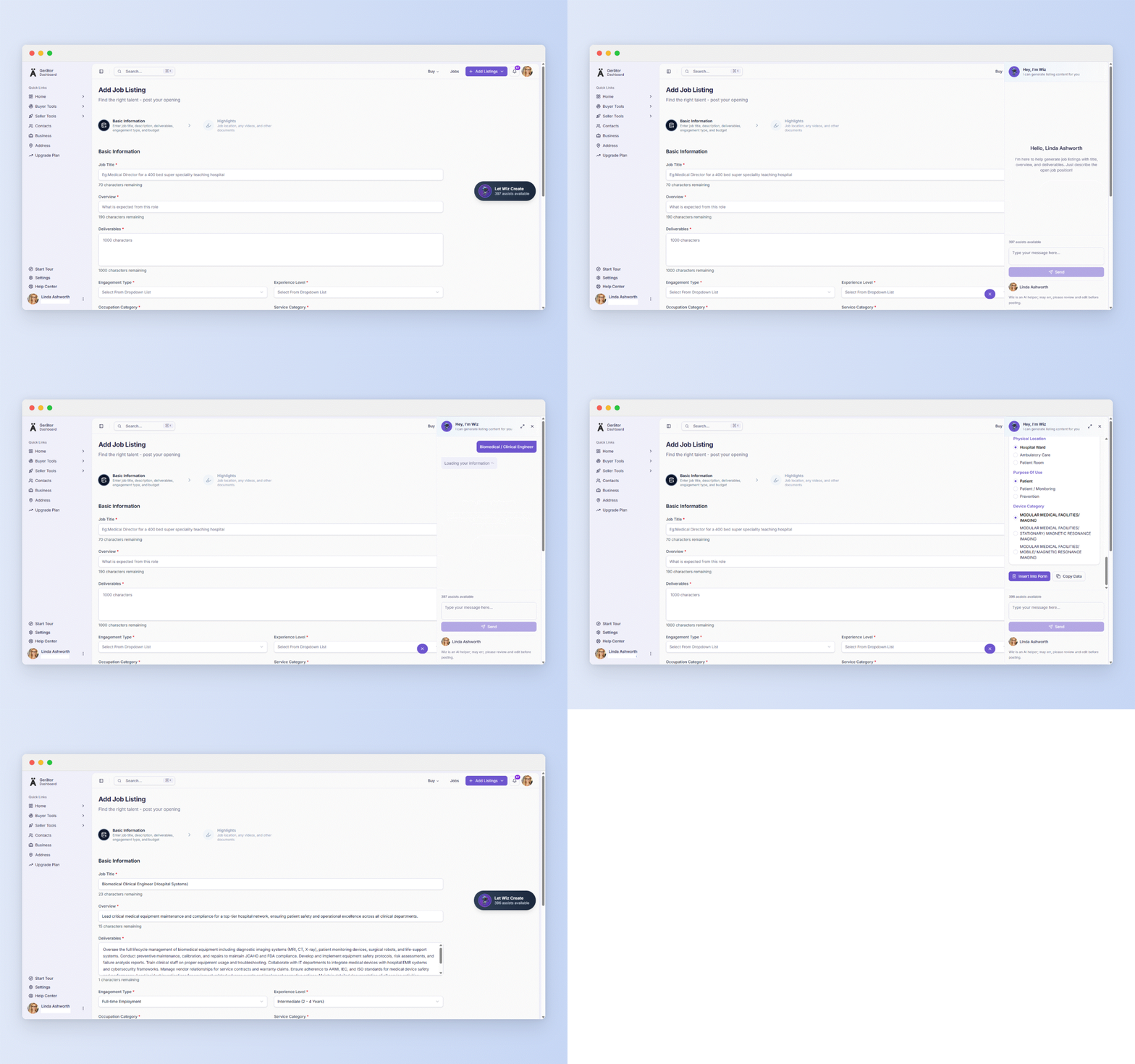
Let Wiz do the first draft
You don’t need to fill in the fields first. Open Wiz and give it a short prompt such as “Biomedical / Clinical Engineer”. Wiz researches the role and generates the content for you to review. Read every field before moving on, and edit anything that doesn’t match your actual role, your site, or your standards.
Step 2: Highlights
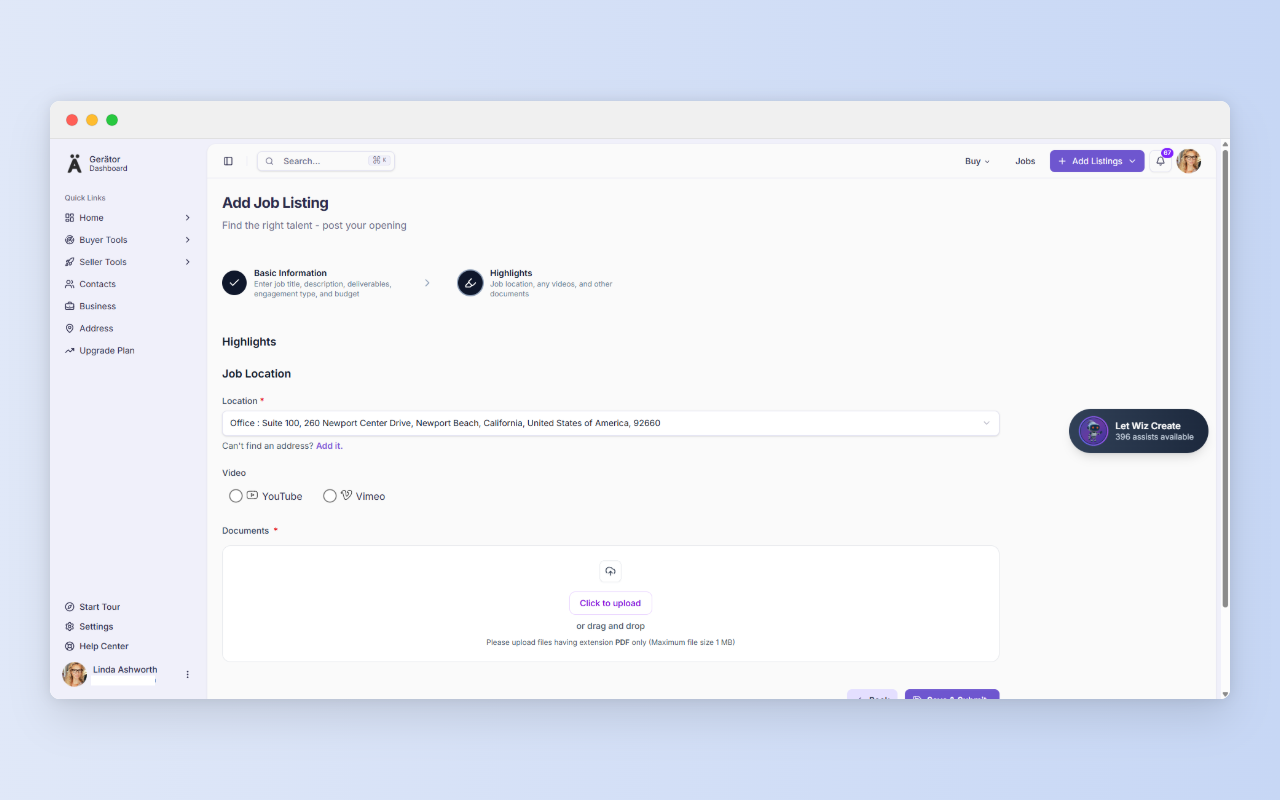
This step grounds the role in the real world.
- Location (required): Choose from the addresses saved in your Address page. If the address isn’t there, use the “Can’t find an address? Add it.“. Candidates read this as the place they’d actually work. For context, LinkedIn reported that postings with an exact address are 60% more likely to be viewed.
- Video: Link a YouTube or Vimeo video, such as a short walkthrough of the department or team. It’s optional, and it works best as a complement to the written post.
- Documents: Upload a PDF (maximum 1 MB) with anything that doesn’t fit in the Deliverables box, such as a fuller job description or a credentials list.
When everything looks right, select Save & Submit.
Pick the role you’ve been putting off, open Add Job Listing, and give Wiz a two-word prompt. You’ll have a full draft to edit before your coffee gets cold.
Try it on your next opening
Three ways recruiters can use this
- A refurbisher hiring a clinical engineer: Prompt Wiz, review the draft, attach a PDF with the equipment portfolio, and post.
- A service company adding field technicians: Set the location to the regional office so candidates nearby can tell at a glance.
- A hospital biomedical team filling a contract role: Select the right engagement type so applicants know it’s project-based before they apply.
No business email yet?
A business profile requires a business email, and Gerätor recognizes public providers such as Gmail, Yahoo, Hotmail, Outlook, and Protonmail. If you signed up with one, you won’t be able to create a business profile. You’ll be prompted to get a business domain and email instead, with GoDaddy offered as an option through our partnership. Then log out and create a new account with your new business email.
If you later want a website too, Cloudways offers managed cloud hosting built for speed, security, and performance, whether you’re launching a new site or scaling an existing one.
In regions where you are unable to progress to location without a business email, once your business email is ready, add your first address at https://gerator.com/dashboard/settings/address. It takes a few minutes, and it answers the first question every buyer asks.
A few more things before you go…
We value clarity and fairness. Here are a few helpful links to read as a new user:
Terms of Use – Understand your rights and responsibilities.
Privacy Policy – Learn how we handle your data with care.
Security – Know the steps we take to protect your account.
Business Verification – See how we build trust in our ecosystem.
Pricing – Compare plans and their benefits.
Refund Policy – Know your options if things don’t go as planned.