


Why am I seeing this picture? Media Credit – Freepik
Important Note for Sellers: To set up a business profile which is mandatory for sellers, create an account with an email address from your business domain (Example - [email protected]).

Subscription Plans & Feature Availability  ✓ Give  ✓ Nurture  ✓ Thrive  ✓ Flourish
If you run an independent medical tech service business, or you’re a technician who works for yourself, you probably know a problem that has nothing to do with your skills.
You can keep a PET/CT scanner running, calibrate a system back to spec, and source the right part when the manufacturer’s channel is slow. But getting that across to a buyer, in writing, before they’ve ever spoken to you, is a different job. These are the challenges that keep coming up:
- You’re competing with the manufacturer’s name. Buyers know the OEM. They don’t know you, so they need evidence quickly.
- A service is hard to show. There’s no photo of a “turnaround time.” Scope, response commitments, and warranty have to be explained clearly, or buyers assume the worst.
- Pricing is awkward. Service work varies by system and condition, so many providers say “contact us.” Buyers read that as “expensive or evasive” and move on.
- Generic listings attract the wrong inquiries. Without clear device compatibility and coverage area, you field calls about systems you don’t service and regions you don’t reach.
- Writing a good listing takes forever. Researching the market, drafting the scope and SLA, and pricing the work can take 45 to 60 minutes on a typical platform. Many providers cut corners, or never finish.
None of this is a question of quality. Third-party servicers are an established part of the market: the FDA’s 2018 report on device servicing concluded that the continued availability of third-party entities to service and repair medical devices is critical to the U.S. healthcare system. The challenge is making that capability visible and credible to a buyer who has never heard of you.
How Gerätor approaches it
Gerätor’s Add Service Listing workflow is built around what buyers need to see:
- Structured, searchable information. A proprietary taxonomy and geolocation features mean your service is tagged by category, clinical application, device category, and location, so it reaches buyers filtering for exactly what you do.
- Visible pricing. A price range and unit of measure replace “contact us” without forcing you into a fixed quote.
- Space for the details buyers vet. Dedicated fields for scope of work, SLA, compatible devices, and supporting documents let you show your credibility.
- Wiz, an AI agent that does the research. Wiz researches your service and drafts the content, including a market-valid price range, at the click of a button. A listing that takes 45 to 60 minutes on competing platforms takes under 5 minutes with Wiz.
- A review before you go live. Every submitted listing goes through a Trust and Quality Analyst (TQA) review, normally in less than one business day.
Here’s how it works, step by step.
Before you start
The Add Service workflow is available to users with an approved business profile. If you haven’t set one up, start with Building Your Business Presence.
Step 1: Basic information
This is the commercial core. Choose your Service Category and write a Service Value Proposition, a headline of around 70 characters that appears in search results. Then set a price range (minimum and maximum) and a unit of measure, such as USD per year.
Next, tag the service so the right buyers find it: Clinical Applications, Service Use, Device Category, and Physical Location, which is the department within the medical facility where the device sits.
Tip: Be specific in the headline. “Full repair and parts replacement for Siemens Biograph 6 PET/CT” tells a buyer far more than “imaging service.”
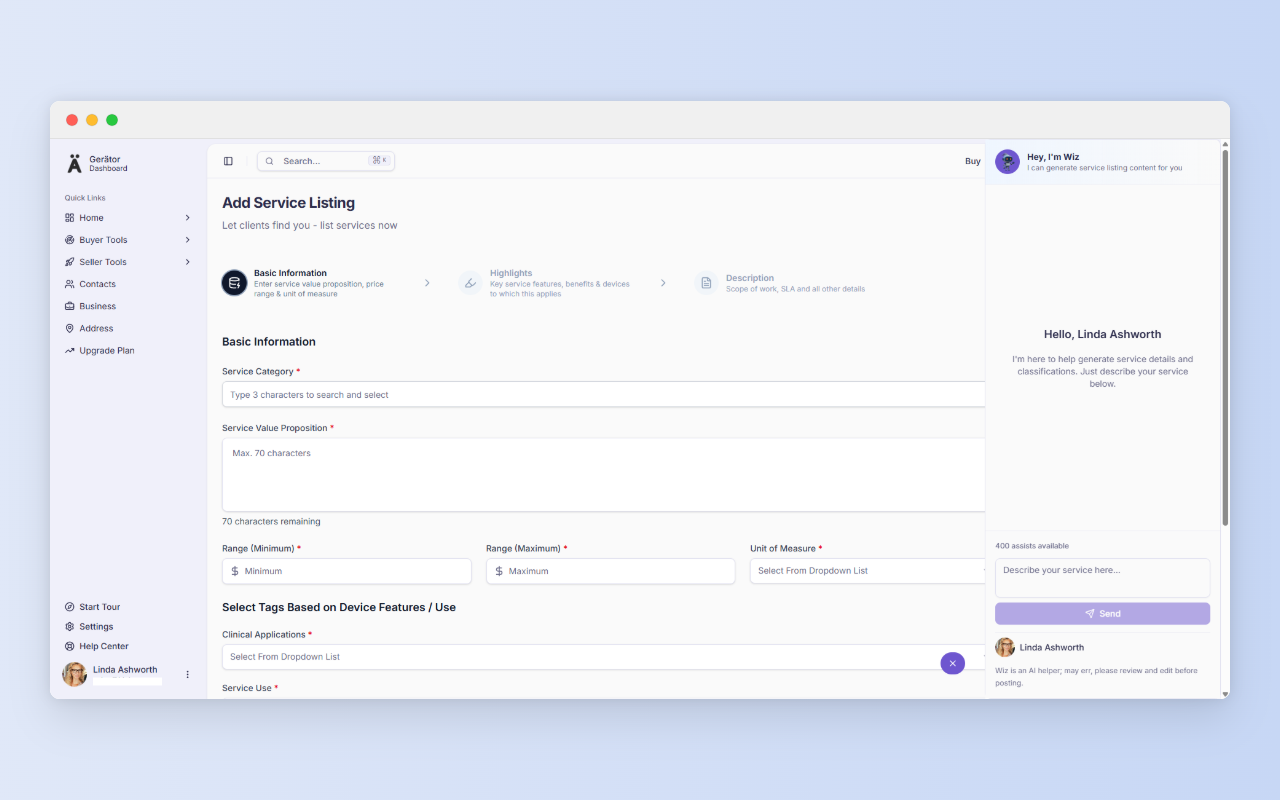
With Wiz AI – you don’t have to manually fill the form
You can open Wiz AI straight away and give it a prompt such as:
“Service for Siemens Biograph 6 PET/CT – full repair and parts replacement.”
Wiz researches the service and fills in the fields. For Step 1 it also suggests the tag fields (you check and confirm them).
Wiz works within your plan’s assist quota; see the Gerätor pricing plans for details. And you stay in control: review every field and edit as needed before submitting.
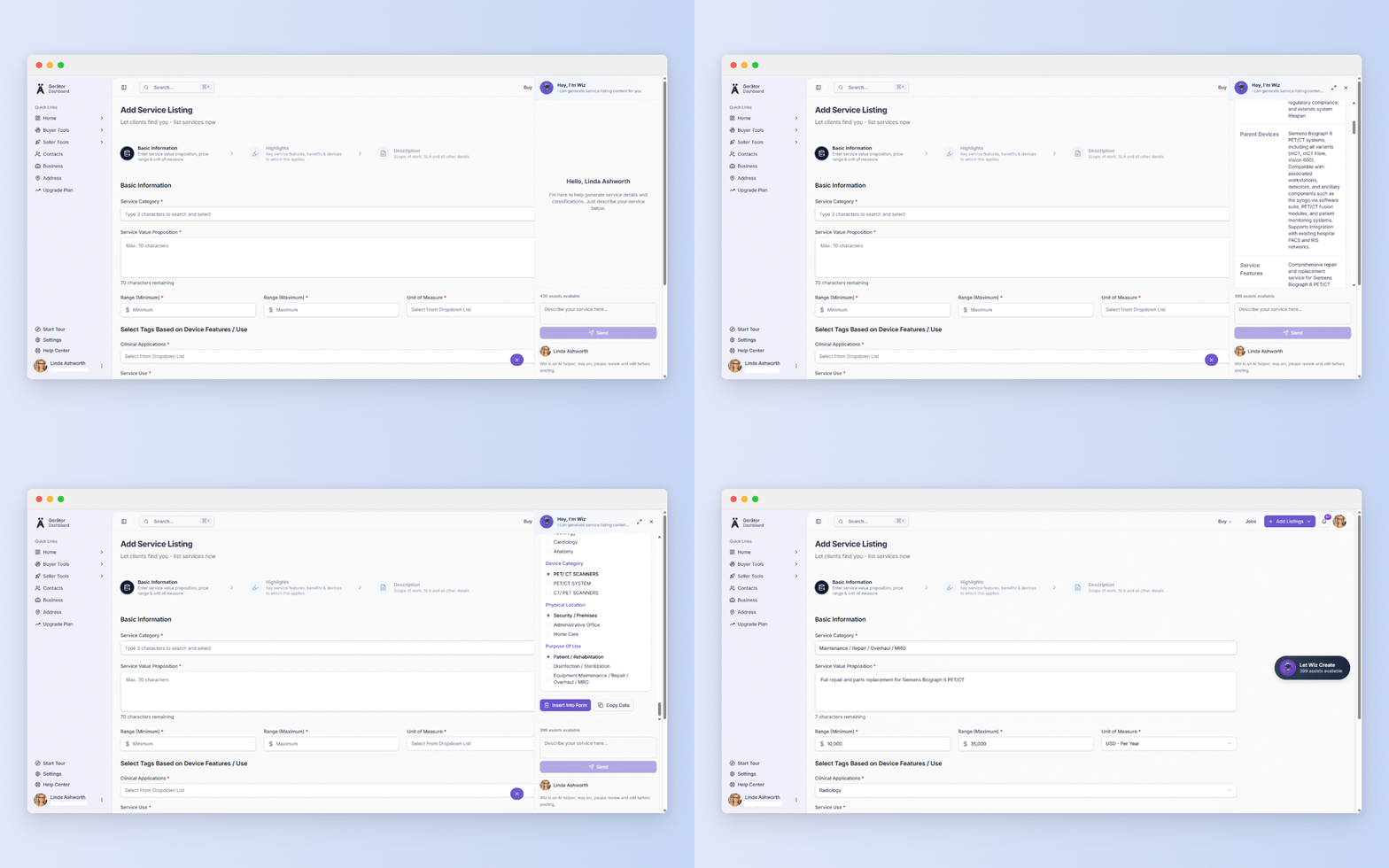
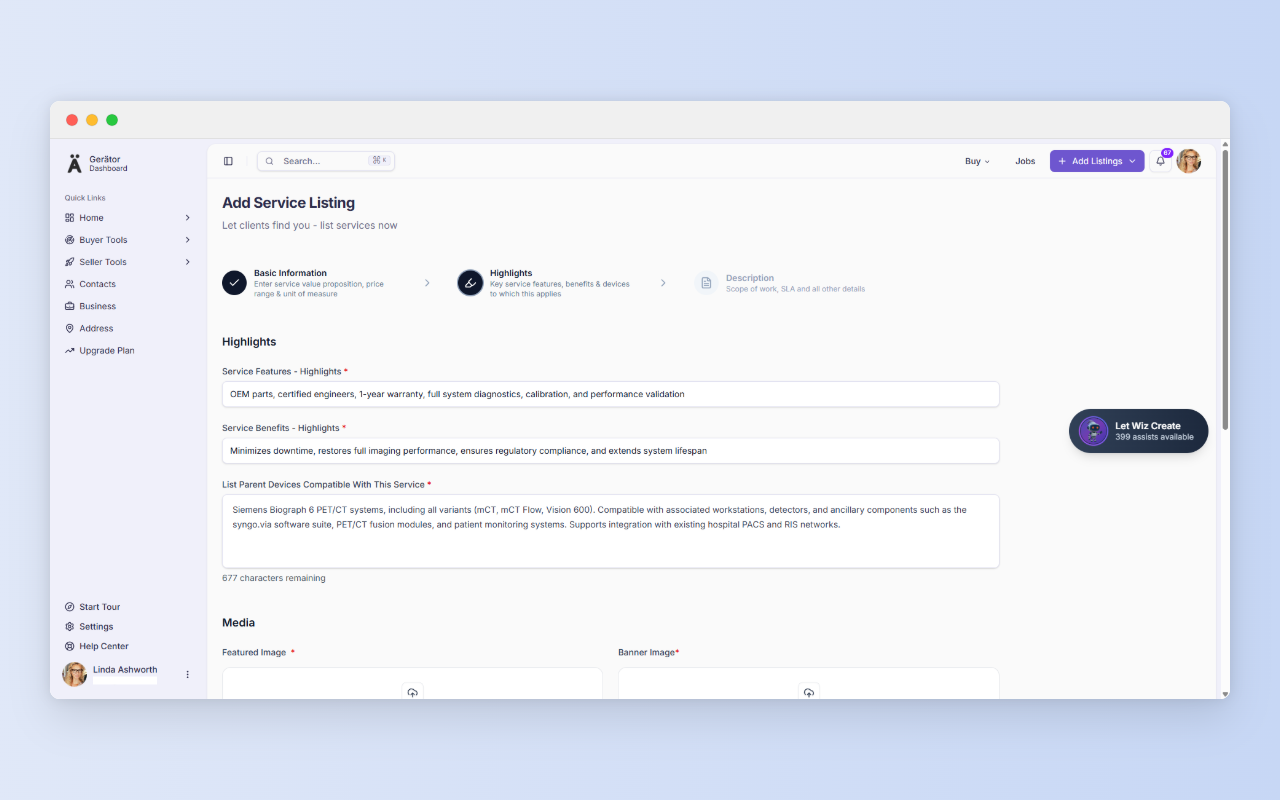
Step 2: Highlights
List the key service features and benefits, and name the parent devices the service is compatible with. Then upload a featured image and a banner image (PNG, JPEG, or WEBP, between 50 KB and 1 MB, with the minimum enforced), and optionally link a YouTube or Vimeo video.
Finally, select your Key Service Delivery Center from your saved addresses (you can add one on the spot as well) and your Service & Support Reach, for example – North America.
Tip: Be precise in the compatibility list. Name only the models you actually service, because a buyer with a different system will notice an overreach straight away.
Open Wiz, describe your service in one line, review what it drafts, and submit. Most of the work is already done.
Ready to try it?
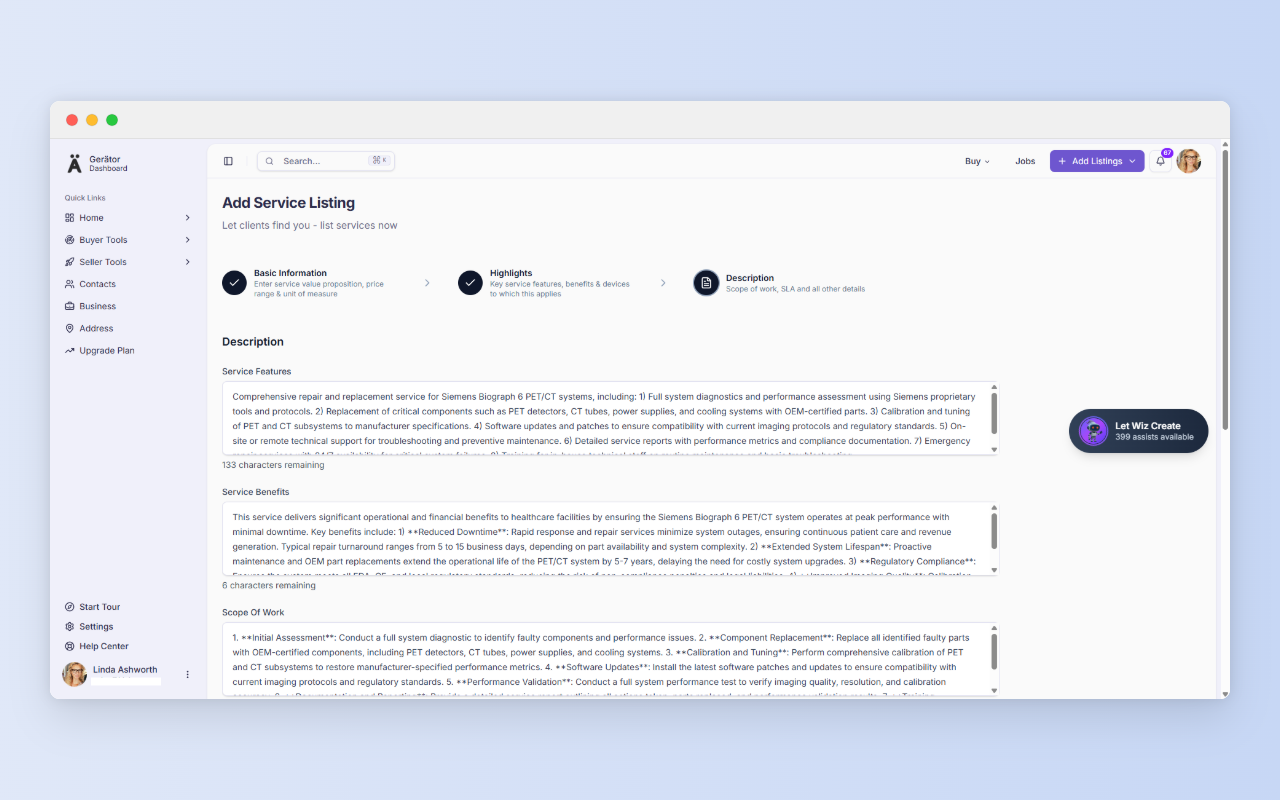
Step 3: Description
Here buyers do their due diligence. Detail your service features and benefits, the scope of work, your service level agreement, and any additional information. You can also upload supporting documents as PDFs (up to 1 MB each). They’re optional, but credentials, certifications, sample service reports, and warranty terms give your claims proof.
When you’re done, click Save & Submit. Your listing moves to the TQA review queue, normally for less than one business day.
Check your numbers before you submit
- Wiz is fast, which makes the review step easy to rush. Before submitting, check:
- Price range and unit. These are commercial commitments.
- SLA figures. Response times, completion targets, and guarantees are promises buyers will hold you to.
- Compatible devices. Make sure every model listed is one you actually service.
- Completeness. Scroll to the end of each field to confirm no sentence was cut off.
Who this works for
- An independent repair firm listing a specialty service on a legacy imaging system, with a clear price range and SLA.
- A refurbisher adding post-sale support and warranty-backed repair alongside device listings.
- A field engineer or small team with a specialty such as calibration, which buyers search for by device category.
- A multi-modality service organization creating separate listings per device category so each reaches the right buyer.
How it fits the bigger picture
Your service listing works best alongside the rest of your presence on Gerätor. Your business profile and saved addresses feed the listing, and if you also sell equipment or parts, you can add those through the device and spare/part listing flows.
No business email yet?
A business profile requires a business email, and Gerätor recognizes public providers such as Gmail, Yahoo, Hotmail, Outlook, and Protonmail. If you signed up with one, you won’t be able to create a business profile. You’ll be prompted to get a business domain and email instead, with GoDaddy offered as an option through our partnership. Then log out and create a new account with your new business email.
If you later want a website too, Cloudways offers managed cloud hosting built for speed, security, and performance, whether you’re launching a new site or scaling an existing one.
In regions where you are unable to progress to location without a business email, once your business email is ready, add your first address at https://gerator.com/dashboard/settings/address. It takes a few minutes, and it answers the first question every buyer asks.
A few more things before you go…
We value clarity and fairness. Here are a few helpful links to read as a new user:
Terms of Use – Understand your rights and responsibilities.
Privacy Policy – Learn how we handle your data with care.
Security – Know the steps we take to protect your account.
Business Verification – See how we build trust in our ecosystem.
Pricing – Compare plans and their benefits.
Refund Policy – Know your options if things don’t go as planned.