


Why am I seeing this picture? Media Credit – Freepik
Important Note for Sellers: To set up a business profile which is mandatory for sellers, create an account with an email address from your business domain (Example - [email protected]).

Subscription Plans & Feature Availability  ✓ Give  ✓ Nurture  ✓ Thrive  ✓ Flourish
If you’ve traded parts for any length of time, you know the email thread.
You list a tube pulled from a decommissioned CT. It’s tested and it looks clean. Within the hour: Which revision is it? Can you send the serial? Are the cables included? Do you have a test report? Where’s it shipping from?
“Revision” is the version stamp on the part’s label, usually next to the part number. A board or assembly can change revision without changing part number, and two revisions aren’t always interchangeable in the same system. Buyers who’ve been burned ask first.
None of those questions is unreasonable. The buyer can’t pick the part up, turn it over, and read the label plate, so they ask you to. The problem is that you answer them one at a time, for every part, every week. And some buyers don’t wait for the reply.
Why buyers ask
It comes down to three risks.
Will it fit? Buyers are advised to confirm the part is compatible with their platform and that the OEM still supports the model, or they may find they can’t get replacement parts later.
Where did it come from? An OEM service leader has warned that parts pulled from used equipment can be hard to trace in origin and life expectancy.
Can you prove it? In used scanner sales, the condition evidence (service history, PM records, CT tube counts) is what sets the price. Buyer checklists ask for service history, maintenance logs, calibration records, and upgrade notes.
A listing that answers those three up front shortens the conversation. One that doesn’t hands the work to you.
Answer once, in a structure buyers search by
Gerätor’s spare/part listing is built around that idea. It uses proprietary taxonomy structures with geolocation features so each listing carries accurate, searchable information. It takes three steps, and it’s available to users with an approved business profile. If you haven’t set that up, start with building your business presence. Then go to gerator.com/dashboard/add-spare.
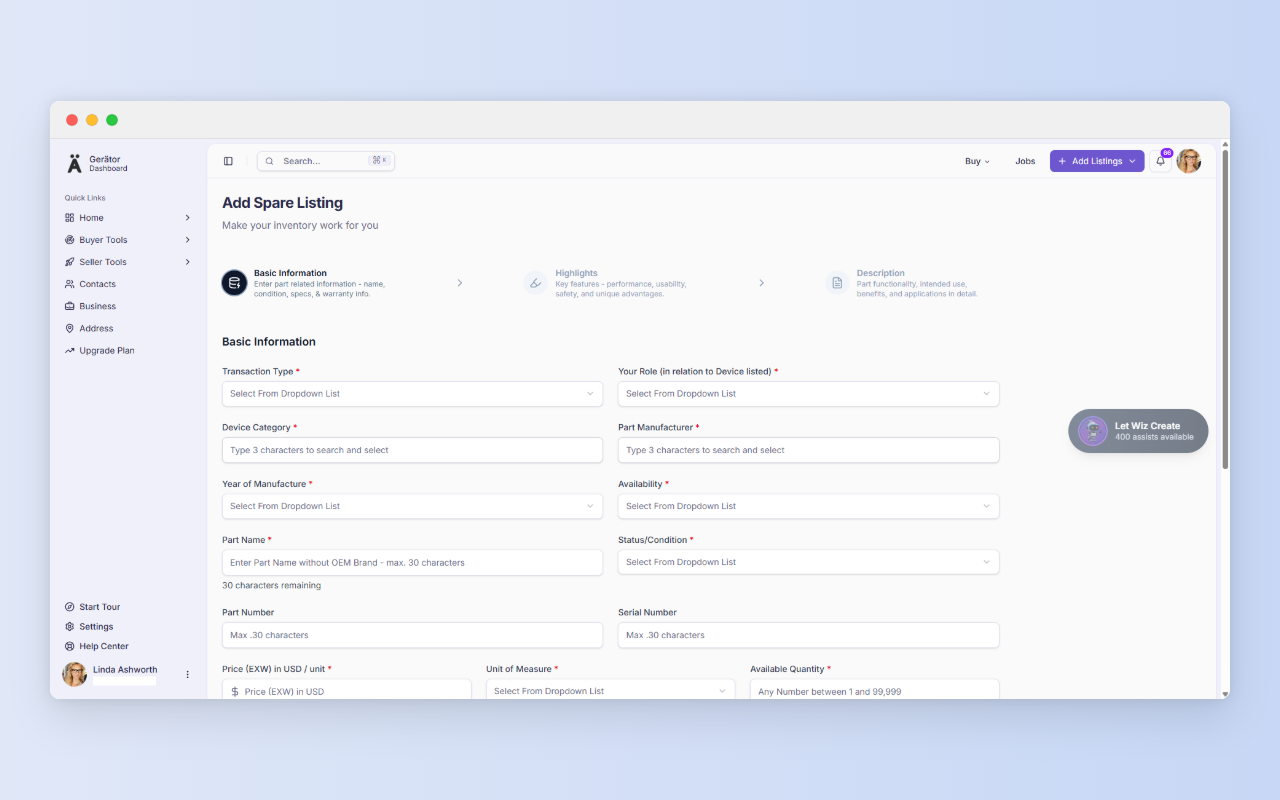
Step 1: Basic information – say exactly what the part is
Pick the category, manufacturer, and part name so the right buyers find you. Be straight about condition and year of manufacture. Add the part number and serial number, because those are what a service engineer checks first.
Then set price, unit, quantity, warranty, and shipping. Prices are EXW (ex-works), so they exclude shipping and duties. You’re pricing the part at your door, and the buyer sorts out freight.
Each field does one of three jobs: it builds buyer trust, feeds search and matching, or supports compliance and risk. Most do more than one. The more accurate you are here, the fewer questions you’ll field later.
Where Wiz AI comes in
Once the required Step 1 fields are filled, Wiz can draft the rest. Wiz is an agentic AI. A chatbot answers a prompt. An agentic system plans a multi-step task, uses tools, and iterates toward a goal. Here, that means Wiz researches and consolidates content, then inserts it into the listing fields at the click of a button.

The time difference is real. In a focus-group work study, a well-researched listing took 27 to 45 minutes on competing platforms and under 5 minutes with Wiz. Usage limits depend on your plan.
Important: My advice is to read what Wiz writes before you submit. You know the part. Buyers will hold you to every claim on the page.
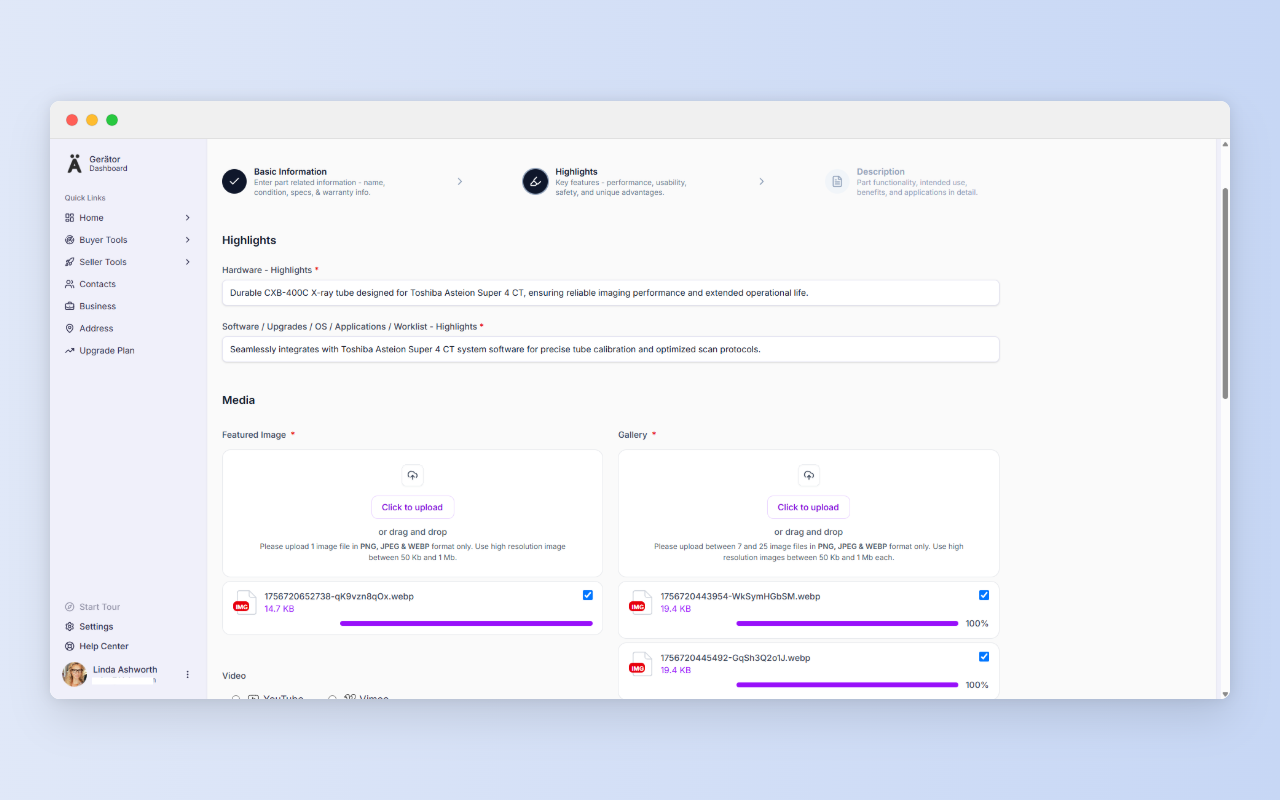
Step 2: Highlights – show what buyers can’t see
This is where you stand in for the buyer’s eyes. Put real numbers on the key hardware specs, software versions, and accessories. Say what’s included and what’s only compatible. That one distinction prevents a lot of wrong-fit returns.
Upload one featured image and 7 to 25 gallery photos (PNG, JPEG, or WEBP, 50 KB to 1 MB each). Cover the front, the back, and the label plate. The label plate matters most, since it’s where the part number and revision live. One marketplace study summary links multiple angles to higher sales. A short YouTube or Vimeo video helps too, especially a part powering up or running. Then confirm where the part is, using an address saved on your Address page.
Before you submit, read the three steps back to back. If Step 1 says “tested” and nothing in Step 3 backs it up, add the report.
One habit worth building
Ready to list a part?
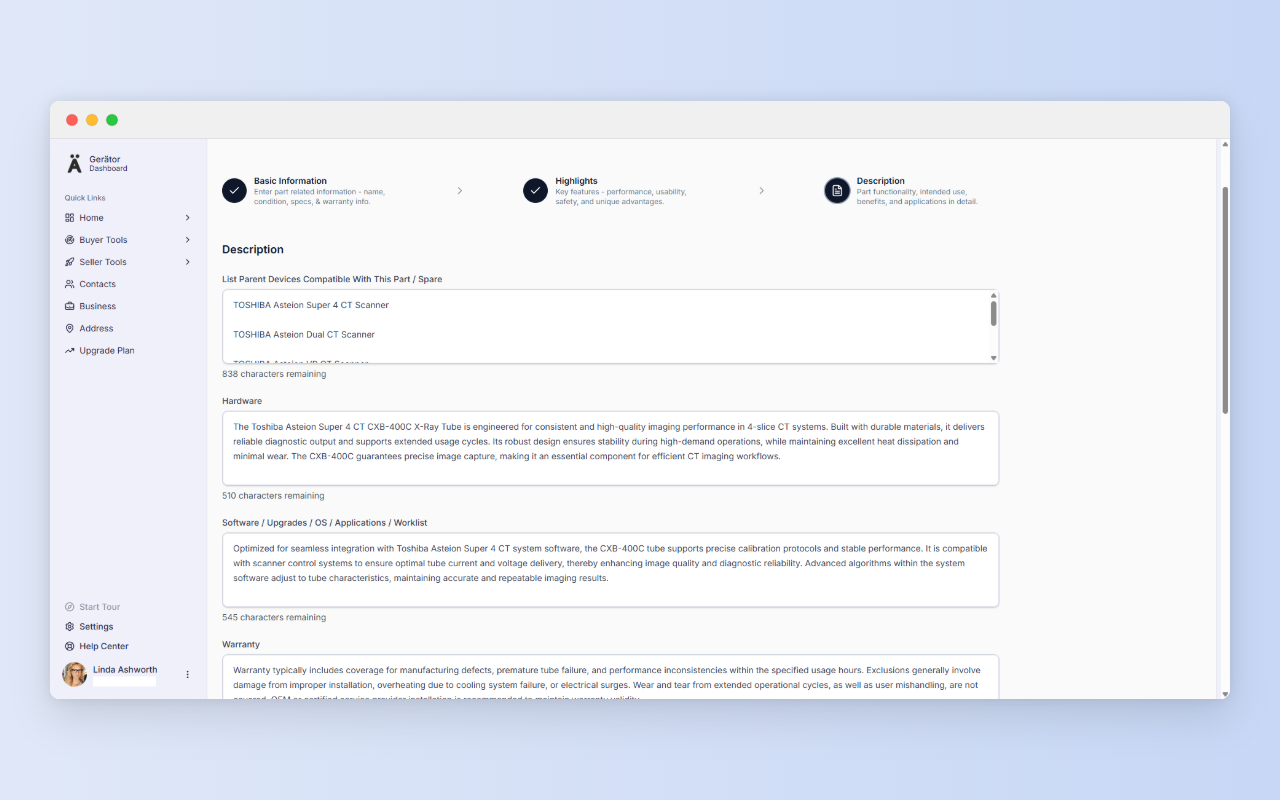
Step 3: Description – give buyers something to verify
Step 3 is where a careful buyer goes to check you. Cover hardware, software, warranty, service history, and what’s in the box. Keep it consistent with Steps 1 and 2. Be specific: dates, durations, and exactly what’s covered.
Then upload your supporting PDFs (max 1 MB each): service records, certificates, manuals. Documents are the only required field in this step, because they turn claims into proof. If you say a part is tested, attach the report. Double-check any regulatory numbers before you submit.
How it plays out
- Traders: a tube with label-plate photos and a usage record lets the buyer match the part number to their system without asking.
- Refurbishers: a test report on each tested board means the proof travels with the listing.
- Service engineers: leftover spares from finished jobs become listings with the part number and serial already in hand.
- High-volume sellers: Wiz drafts the text, and you review it.
How it fits
A good listing starts with a good business profile and a saved address, since buyers can search by proximity to the locations they prefer.
No business email yet?
A business profile requires a business email, and Gerätor recognizes public providers such as Gmail, Yahoo, Hotmail, Outlook, and Protonmail. If you signed up with one, you won’t be able to create a business profile. You’ll be prompted to get a business domain and email instead, with GoDaddy offered as an option through our partnership. Then log out and create a new account with your new business email.
If you later want a website too, Cloudways offers managed cloud hosting built for speed, security, and performance, whether you’re launching a new site or scaling an existing one.
In regions where you are unable to progress to location without a business email, once your business email is ready, add your first address at https://gerator.com/dashboard/settings/address. It takes a few minutes, and it answers the first question every buyer asks.
A few more things before you go…
We value clarity and fairness. Here are a few helpful links to read as a new user:
Terms of Use – Understand your rights and responsibilities.
Privacy Policy – Learn how we handle your data with care.
Security – Know the steps we take to protect your account.
Business Verification – See how we build trust in our ecosystem.
Pricing – Compare plans and their benefits.
Refund Policy – Know your options if things don’t go as planned.